Find the businesses
Type a trade and some cities (“plumber”, “Austin, Round Rock”): the list comes from Google Maps. Or import your own CSV or Excel file.
Site Hunter analyses the websites of businesses in your area, finds those that are broken, expired or outdated, and prepares the report and the message to contact them.
A business whose website is down loses customers every day. It has a good reason to answer you.
Type a trade and some cities (“plumber”, “Austin, Round Rock”): the list comes from Google Maps. Or import your own CSV or Excel file.
Each site is opened the way a visitor would, on a computer and on a phone, with screenshots. 10 sites at a time, paused whenever you like.
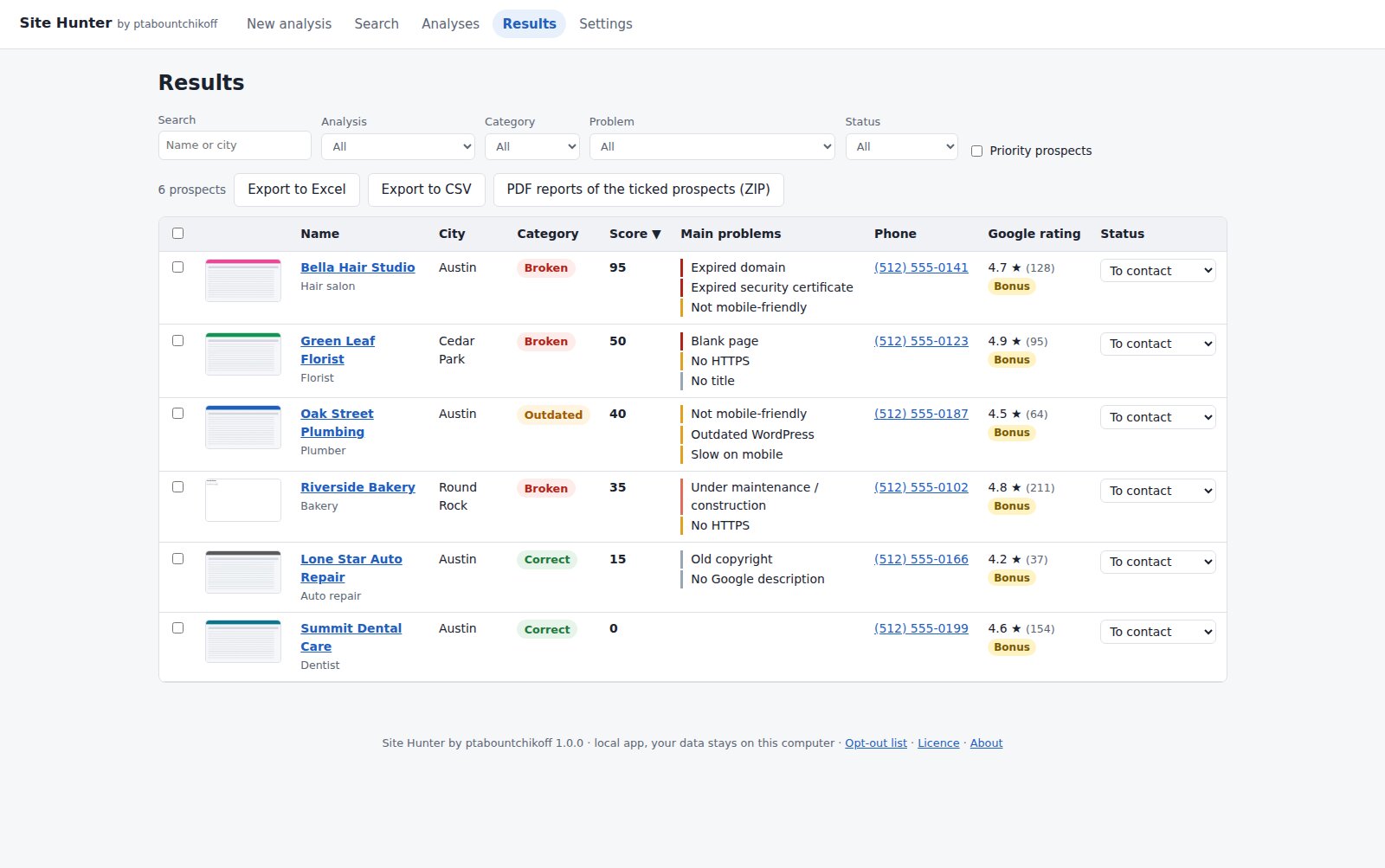
The worst sites first. One click: PDF report in your colours, email, call script and text message already written.
Expired or for-sale domain name, server error, blank page, expired security certificate, hacked site, “under construction” for years.
Not mobile-friendly, “Not secure”, copyright from 2012, outdated WordPress, slow on mobile, invisible on Google… Every point counts in the score.
What the customer sees, on a computer and on a phone. Nothing speaks louder to a business owner than a picture of their own broken website.
Email, call script and text message written for each business, with its problems explained without jargon. You read, you copy, that's it.
A broken website + more than 20 well-rated Google reviews = a business with customers and a budget. One filter puts them at the top of the list.
Rerun an analysis every week and see which sites have become broken since last time: the right moment to call.
Two clear pages, in your name and colours, that a business owner understands without being technical.

A single signed redesign more than pays for the software.
For 2 computers, Windows or Mac. Sold to businesses only. Price in US dollars; any local taxes are the buyer's responsibility.
Or all 3 VORELIK apps in a bundle: $199 instead of $267 →
The trade + city search uses your own Google Maps key: Google offers a free quota every month; beyond it, searches are billed by Google. Analysing your own files needs no key.
No. You download the file, double-click it, and the app opens in your browser. Everything is done with the mouse.
Yes. The app, the PDF reports, the exports and the messages are in English (or in French: you choose in Settings). By default, Site Hunter uses your computer's language, and in English the Google search is not limited to one country.
Only for the “trade + city” search. You can also import your own lists (CSV or Excel, with at least the name and the website address): in that case, no key is needed.
Google offers a free quota every month. Before each search, Site Hunter shows the maximum number of requests and an estimated cost, so you are never surprised.
Each site is tested twice before being declared down, then opened in a real browser. Every problem comes with its evidence (error message, expiry date, screenshot). If the analysis could not see a site, it is marked “To recheck”, never wrongly classified.
Yes. Site Hunter works on Windows 10 / 11 and on Mac, with one version for Apple silicon Macs (M1 to M4) and one for Intel Macs.
Yes, for recent software they don't know yet. On Windows, click “More info” then “Run anyway”. On Mac, open System Settings → Privacy & Security and click “Open Anyway”. You only do it once.
On your computer, and nowhere else. Your prospects, your notes and your keys are not sent to any server; the keys are encrypted. Only your license key is checked online, once a day.
Right after payment, your license key appears on the thank-you page; it is valid on 2 computers. You paste it on first launch, and that's it. It is checked online once a day; without Internet, the software stays usable for 14 days. To change computers, release the license in one click. If the purchase is refunded, the license is deactivated.
Contacting businesses about their professional activity is generally allowed, as long as you offer a simple way to refuse further contact; rules vary by country (GDPR in Europe, CAN-SPAM in the US, PECR in the UK…). Site Hunter helps: built-in opt-out list, one-click prospect deletion, automatic deletion of prospects never contacted after 12 months. If in doubt, check with a legal adviser.
Run your first analysis and discover the businesses in your city whose website is falling apart.
Get Site Hunter →