Choose a trade
Hair salon, plumber, bakery, auto repair… 30 ready-made trades, or type any trade you want.
BridgeToLeads finds businesses with no website on Google Maps, by trade and city, and gives you a lead list ready to call, exported to Excel.
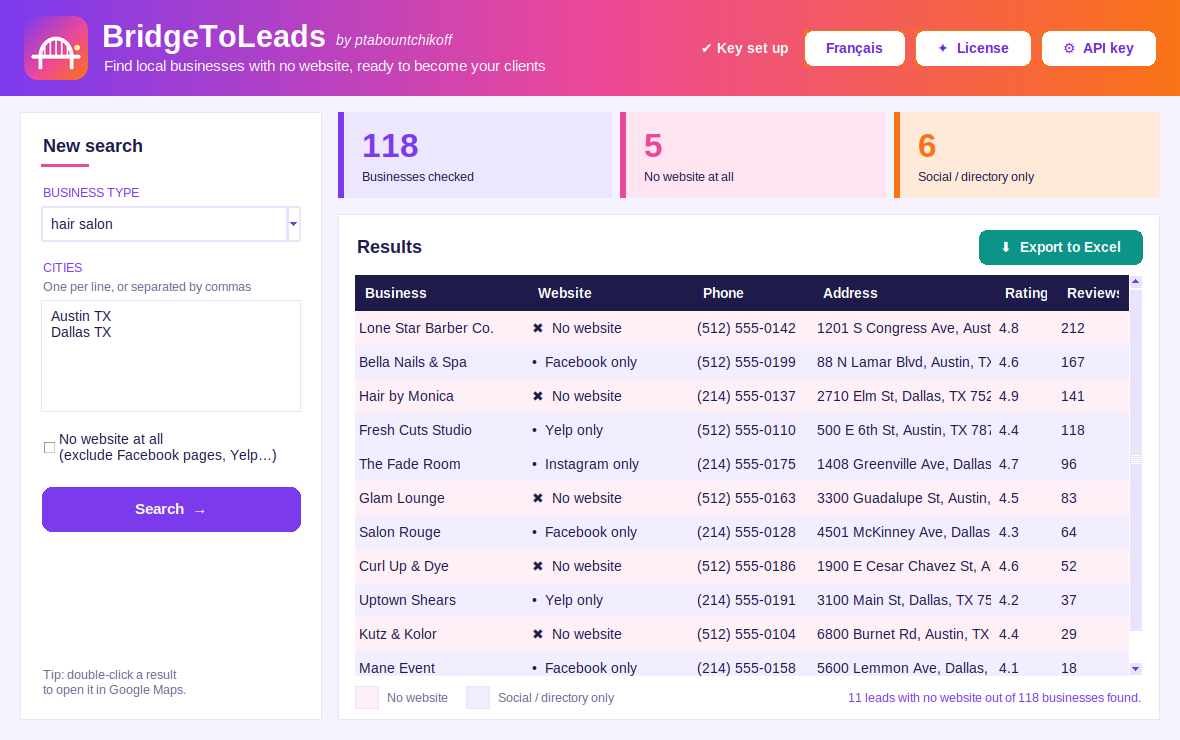
No more hours spent digging through Google Maps one listing at a time.
Hair salon, plumber, bakery, auto repair… 30 ready-made trades, or type any trade you want.
One or several cities at once. BridgeToLeads searches Google Maps and removes duplicates.
Get name, phone, address, rating and reviews in an Excel file, and start prospecting.
Only businesses with no website show up. Those that already have one are left out automatically.
A business with only a Facebook, Instagram or Yelp page is a lead too. BridgeToLeads flags it.
Results sorted by number of Google reviews: established businesses, with a budget, come first.
Clear headers, filters on every column and a clickable Google Maps link for each business.
Phone, address, category, rating and number of reviews: everything to prepare your call.
BridgeToLeads uses the official Google Places API, not scraping: reliable, up-to-date data.
A single signed client more than pays for the software.
For 2 computers, Windows or Mac. Sold to businesses only. Price in US dollars; any local taxes are the buyer's responsibility.
Or all 3 VORELIK apps in a bundle: $199 instead of $267 →
Not sure yet? Try it for free in your city →
Requires your own Google Maps API key. Google offers a free usage quota every month; beyond it, searches are billed by Google.
No. You download the file, double-click it, paste your Google key once, and you're ready. Everything is done with the mouse.
It's a personal code Google gives you for free to search Google Maps. Creating it takes about ten minutes, and the app shows you where to get it.
Google offers a free quota every month, enough for regular local prospecting. Beyond it, searches are billed by Google to your account. You can set a budget alert so you're never surprised.
Anywhere Google Maps lists businesses: United States, Canada, United Kingdom, Australia and more. Just type the city the way you would on Google Maps (for example “Austin TX” or “Leeds UK”).
Yes. BridgeToLeads runs on Windows 10 / 11 and on Mac, with one version for Apple silicon Macs (M1 to M4) and one for Intel Macs.
Yes, for recent software they don't know yet. On Windows, click “More info” then “Run anyway”. On Mac, open System Settings → Privacy & Security and click “Open Anyway”. You only do it once.
Right after payment, your license key appears on the thank-you page; it is valid on 2 computers. You paste it on first launch, and that's it. It is checked online once a day (only the key and an anonymous computer ID are sent); without Internet, the software stays usable for 14 days. To change computers, “License” button → “Release”. If the purchase is refunded, the license is deactivated.
Contacting businesses about their professional activity is generally allowed, as long as your offer relates to their business and you let them opt out of further contact; rules vary by country (CAN-SPAM and TCPA in the US, CASL in Canada, PECR in the UK…). If in doubt, check with a legal adviser.
Run your first search and discover the businesses in your city that don't have a website yet.